Today felt like such a long day. I crammed for my 187 paper last night, which was harder than I expected because holography is such a foreign topic to me still. In any case, I've done most of the objectives of this activity and started writing the content of this entry yesterday, so all I had to do today was find the last of the image types I was lacking and get their info.
These are images from my library and from the wonderful world wide web. The ones I got from the net, I noted the url of the image. The first four image types and the conversions were done using Scilab while the last four image types were analyzed in MATLAB.
Grayscale Image
This is one of my Tia's pictures when she attended a conference in Paris. This was taken in black and white, and saved as JPEG as most cameras do.

-->imfinfo('C:\Documents and Settings\2006-54324\Desktop\BingBW.jpg', 'verbose')
FileName: C:\Documents and Settings\2006-54324\Desktop\BingBW.jpg
FileSize: 639006
Format: JPEG
Width: 1000
Height: 1333
Depth: 8
StorageType: truecolor
NumberOfColors: 0
ResolutionUnit: inch
XResolution: 300.000000
YResolution: 300.000000
FileName: C:\Documents and Settings\2006-54324\Desktop\BingBW.jpg
FileSize: 639006
Format: JPEG
Width: 1000
Height: 1333
Depth: 8
StorageType: truecolor
NumberOfColors: 0
ResolutionUnit: inch
XResolution: 300.000000
YResolution: 300.000000
Two summers ago, my friends and I went to Pangasinan. We stayed at Bolinao, and this was taken in a light house overlooking white sand beach. I think Hannah resized the images she had of us, taken with her D40, and saved it as JPEG.

-->imfinfo('C:\Documents and Settings\2006-54324\Desktop\DSC_0823.jpg', 'verbose')
FileName: C:\Documents and Settings\2006-54324\Desktop\DSC_0823.jpg
FileSize: 516218
Format: JPEG
Width: 900
Height: 597
Depth: 8
StorageType: truecolor
NumberOfColors: 0
ResolutionUnit: inch
XResolution: 300.000000
YResolution: 300.000000
Binary Image
Though only black and white, this was categorized as an indexed image by Scilab.
Source: http://idlastro.gsfc.nasa.gov/idl_html_help/images/imgdisp01.gif

-->imfinfo('C:\Documents and Settings\2006-54324\Desktop\imgdisp01.gif', 'verbose')
FileName: C:\Documents and Settings\2006-54324\Desktop\imgdisp01.gif
FileSize: 5135
Format: GIF
Width: 362
Height: 362
Depth: 8
StorageType: indexed
NumberOfColors: 256
ResolutionUnit: centimeter
XResolution: 72.000000
YResolution: 72.000000
Indexed Image
The example we had in class of an indexed image were icons, so I used this icon I made of Jane for this image type. However, Scilab categorized this as truecolor.

-->imfinfo('C:\Documents and Settings\2006-54324\Desktop\jane1.png', 'verbose')
FileName: C:\Documents and Settings\2006-54324\Desktop\jane1.png
FileSize: 13339
Format: PNG
Width: 234
Height: 210
Depth: 8
StorageType: truecolor
NumberOfColors: 0
ResolutionUnit: centimeter
XResolution: 72.000000
YResolution: 72.000000
FileName: C:\Documents and Settings\2006-54324\Desktop\jane1.png
FileSize: 13339
Format: PNG
Width: 234
Height: 210
Depth: 8
StorageType: truecolor
NumberOfColors: 0
ResolutionUnit: centimeter
XResolution: 72.000000
YResolution: 72.000000
High Dynamic Range (HDR) Image
Source: http://jamie-katz.com/images/weekly/hdrDropsOnLeaf.jpg

Filename: '/Users/patriciaromero/Desktop/hdrDropsOnLeaf.jpg'
FileModDate: '25-Jun-2010 17:13:21'
FileSize: 244531
Format: 'jpg'
FormatVersion: ''
Width: 1024
Height: 768
BitDepth: 24
ColorType: 'truecolor'
FormatSignature: ''
NumberOfSamples: 3
CodingMethod: 'Huffman'
CodingProcess: 'Sequential'
Comment: {}
Hyperspectral Image
This is a satellite image taken by the International Society for Photogrammetry and Remote Sensing.
Source: http://www.itc.nl/isprsc7/symposium/images/hyperspectral.jpg

Filename: '/Users/patriciaromero/Desktop/hyperspectral.jpg'
FileModDate: '25-Jun-2010 17:18:46'
FileSize: 36033
Format: 'jpg'
FormatVersion: ''
Width: 403
Height: 336
BitDepth: 24
ColorType: 'truecolor'
FormatSignature: ''
NumberOfSamples: 3
CodingMethod: 'Huffman'
CodingProcess: 'Sequential'
Comment: {}
DigitalCamera: [1x1 struct]
3D image
These are Star Trek ships, image made by a fan. I think this is done using stereopairs.
Source: http://www.foundation3d.com/uploads/general/2009/10/436-09-146257.jpg

Filename: '/Users/patriciaromero/Desktop/3d.jpg'
FileModDate: '25-Jun-2010 17:44:02'
FileSize: 95837
Format: 'jpg'
FormatVersion: ''
Width: 1280
Height: 850
BitDepth: 24
ColorType: 'truecolor'
FormatSignature: ''
NumberOfSamples: 3
CodingMethod: 'Huffman'
CodingProcess: 'Sequential'
Comment: {}
Temporal Image
I'm not sure if this is a temporal image, but it's moving so I guess it is so.
Source: http://www.ucl.ac.uk/~ucesgvd/moebius_w1.0_moving.gif
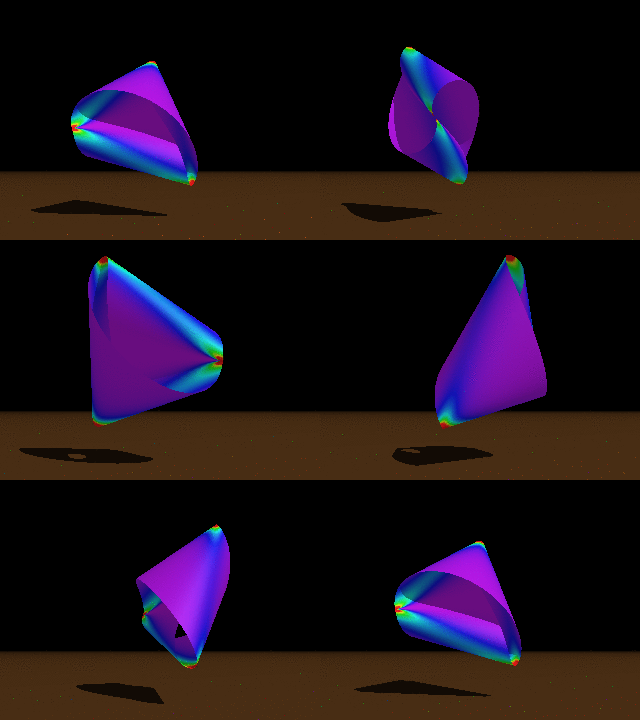
No image information extracted using MATLAB, but here are some using the details the computer gathered.
Document Type: Graphics Interchange Format (GIF)
File Size: 516.2 KB (528,615 bytes)
Image Size: 320 × 240 pixels
Image DPI: 72 pixels/inch
Color Model: RGB
Converted Images:
Using my True Color Image, I used Scilab with SIP Toolbox to convert this image to black and white. Depending on the threshold, the images' conversion went from light to dark. At threshold=0.35 the faces are clear and details are good enough for recognition, but the light house disappeared. At threshold=0.5, a faint circular outline of the light house was recognizable. Finally, at threshold=0.8, the light house was distinct but only the outlines of the other image elements were left.

Threshold at 0.35, notice that the light house is not visible.

Threshold at 0.8, only people's outlines are visible
but the light house is clearly defined.
I also converted it to Grayscale.

True Color to Grayscale.
Using Activity 1's scanned plot, I used the black and white conversion to threshold the unwanted data in the image. But first, we had to take the histogram plot of the original file to get a sense of how we should threshold the conversion.

Original scanned image.
-->S=gray_imread('C:\Documents and Settings\2006-54324\Desktop\186-1.jpg')
Size: 749 rows X 995 columns
Truecolor Image
-->a=linspace(.95,1.05,1000);
-->SH=histplot(a,S);
The image was imported as grayscale. Then the histogram of the grayscaled image was generated to see the distribution of lightness and darkness. The x-axis represents the grayscale values and the y-axis represents the number of pixels.


Histogram of the original scanned image, full (top) and zoomed in (bottom).
Finally, using threshold=0.9, I was able to get a clear though not noiseless image. Although it has specks of unwanted data, the plot is cleaner and the lines are more distinguishable.

Activity 1's image, converted to black and white.
--
Useful links:
http://dali.feld.cvut.cz/ucebna/matlab/toolbox/images/im2bw.html
http://siptoolbox.sourceforge.net/doc/sip-0.2.0-reference/imwrite.html
--
Technical correctness: 5
Quality of presentation: 5
Initiative: Investigated further on effect of threshold value to converted image


